Web/React
React 실습 4 - state 사용하기
괘창
2024. 6. 26. 21:54

- chapter_06 폴더 생성
- Notification.jsx 파일 생성 후 코드 작성
import React from "react"; const styles = { wrapper: { margin: 8, padding: 8, display: "flex", flexDirection: "row", border: "1px solid grey", borderRadius: 16, }, messageText: { color: "black", fintSize: 16, }, }; class Notification extends React.Component { constructor(props) { super(props); this.state = {}; // Notification 컴포넌트는 state에 값을 가지고 있지 않다. } render() { return ( <div style={styles.wrapper}> <span style={styles.messageText}>{this.props.message}</span> </div> ) } } export default Notification; - NotificationList.jsx 파일 생성 후 코드 작성
import React from "react";
import Notification from "./Notification";

const reservedNotifications = [
    {
        message: "안녕하세요, 오늘 일정을 안내드립니다.",
    },
    {
        message: "저녁식사 시간입니다.",
    },
    {
        message: "이제 곧 미팅이 시작됩니다.",
    },
];

var timer;

class NotificationList extends React.Component {
    constructor(props) {
        super(props);

        this.state = {
            notifications: [],
        };
    }

    componentDidMount() {
        const { notifications } = this.state;
        timer = setInterval(() => {
            if (notifications.length < reservedNotifications.length) {
                const index = notifications.length;
                notifications.push(reservedNotifications[index]);
                this.setState({
                    notifications: notifications,
                });
            } else {
                clearInterval(timer);
            }
        }, 1000);
    }

    render() {
        return (
            <div>
                {this.state.notifications.map((notification) => {
                    return <Notification message={notification.message} />;
                })}
            </div>
        )
    }
}

export default NotificationList;
#notificationList 컴포넌트는 notification 컴포넌트를 목록 형태로 보여주기 위한 컴포넌트다.
# 처음 생성자에서 notification라는 이름의 빈 배열을 state에 넣었다.
이처럼 생성자는 앞으로 사용할 데이터를 state에 넣어 초기화 한다.
# 클래스 컴포넌트의 생명주기 함수 중 하나인 컴포넌트 디드 마운트 함수에서는
자바스크립트의 setInterval 함수를 사용하여 매 1000ms, 즉 1초마다 정해진 작업을 수행한다.
이작업은 미리 만들어문 알림데이터 배열인 reserved notifications로 부터 알림데이터를 하나씩 가져와
state에 있는 notification 배열에 넣고 업데이트 한다.
# state를 업데이트하기 위해 setState 함수를 사용했다.
클래스 컴포넌트에서 state를 업데이트 하기 위해선 반드시 setState 함수를 사용해야 한다. - index.js 파일 수정
# NotificationList 컴포넌트를 임포트해서 ReactDOM.render 함수에 넣어주는 코드다.import React from 'react'; import ReactDOM from 'react-dom/client'; import './index.css'; // import App from './App'; import reportWebVitals from './reportWebVitals'; // import Clock from './chapter04/clock'; //import CommentList from './chapter_05/Comment-list'; import NotificationList from './chapter_06/NotificationList'; const root = ReactDOM.createRoot(document.getElementById('root')); root.render( <React.StrictMode> <NotificationList /> </React.StrictMode> ); // If you want to start measuring performance in your app, pass a function // to log results (for example: reportWebVitals(console.log)) // or send to an analytics endpoint. Learn more: https://bit.ly/CRA-vitals reportWebVitals();
결과 이미지)
- React Developer Tools 사용하기
: React 애플리케이션을 개발할 때에는 Chrome 개발자 도구의 Elements 탭을 통해 확인하는 것 보다
React를 위해 별도로 개발된 React Developer Tools라는 도구를 이용하는 것이 더 좋다.

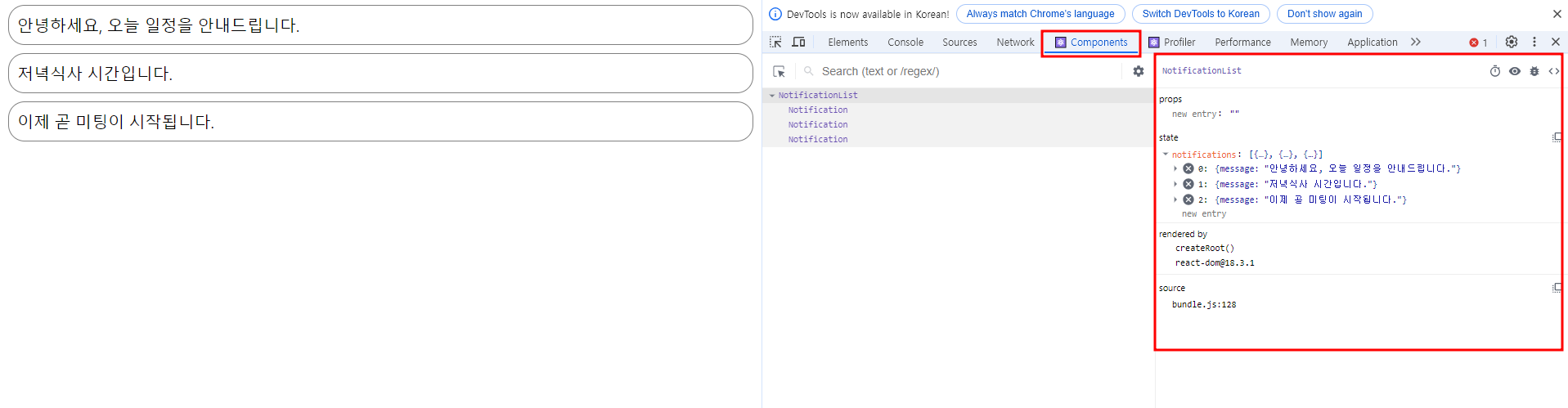
# 각 컴포넌트별로 프롭스와 스테이트도 확인할 수 있다.

# profiler를 사용하면 어떤 컴포넌트가 랜더링 되는지 랜덜이 시간이 얼마나 소요되었는지
그리고 컴포넌트가 왜 다시 랜더링 되었는지 등을 확인할 수 있다.
이를통해 불필요하게 랜덜이되거나 무거운 컴포넌트를 찾아 최적화함으로써 성능 향상이 가능하다.
- Lifecycle method 사용해보기
- Notification.jsx 수정
# 3가지 생명주기 함수들이 호출 될 경우 콘솔에 로그를 남기도록 코드 수정import React from "react"; const styles = { wrapper: { margin: 8, padding: 8, display: "flex", flexDirection: "row", border: "1px solid grey", borderRadius: 16, }, messageText: { color: "black", fontSize: 16, }, }; class Notification extends React.Component { constructor(props) { super(props); this.state = {}; // Notification 컴포넌트는 state에 값을 가지고 있지 않다. } componentDidMount() { console.log("componentDidMoint() called. "); } //추가 componentDidUpdate() { console.log("componentDidUpdate() called."); } //추가 componentWillUnmount() { console.log("componentWillUnmount() called."); } //추가 render() { return ( <div style={styles.wrapper}> <span style={styles.messageText}>{this.props.message}</span> </div> ) } } export default Notification;
해당 함수는 각각 컴포넌트가 마운트된 이유, 업데이트된 이유, 컴파운트가 언마운트되기 전 호출될 것이다.
결과 이미지)
- 로그가 함께 나오게 하기 위해 NotificationList.jsx에 id 추가
# 로그에 아이디가 함께 나오게 하기 위해 각 알림 객체에 아이디 추가# Notificaton 컴포넌트에 key, id 추가import React from "react"; import Notification from "./Notification"; const reservedNotifications = [ { id: 1, message: "안녕하세요, 오늘 일정을 안내드립니다.", }, { id: 2, message: "저녁식사 시간입니다.", }, { id: 3, message: "이제 곧 미팅이 시작됩니다.", }, ]; var timer; class NotificationList extends React.Component { constructor(props) { super(props); this.state = { notifications: [], }; } componentDidMount() { const { notifications } = this.state; timer = setInterval(() => { if (notifications.length < reservedNotifications.length) { const index = notifications.length; notifications.push(reservedNotifications[index]); this.setState({ notifications: notifications, }); } else { clearInterval(timer); } }, 1000); } render() { return ( <div> {this.state.notifications.map((notification) => { return ( <Notification key={notification.id} //추가 id={notification.id} //추가 message={notification.message} /> ); })} </div> ) } } export default NotificationList;
- key : 리액트 엘리먼트를 구분하기 위한 고유 값으로 맵 함수 사용 시 필수! - Notification.jsx 재 수정
import React from "react"; const styles = { wrapper: { margin: 8, padding: 8, display: "flex", flexDirection: "row", border: "1px solid grey", borderRadius: 16, }, messageText: { color: "black", fontSize: 16, }, }; class Notification extends React.Component { constructor(props) { super(props); this.state = {}; // Notification 컴포넌트는 state에 값을 가지고 있지 않다. } componentDidMount() { console.log(`${this.props.id}componentDidMoint() called. `); //역따옴표(`) 사용해서 수정 } componentDidUpdate() { console.log(`${this.props.id}componentDidUpdate() called.`); //역따옴표(`) 사용해서 수정 } componentWillUnmount() { console.log(`${this.props.id}componentWillUnmount() called.`); //역따옴표(`) 사용해서 수정 } render() { return ( <div style={styles.wrapper}> <span style={styles.messageText}>{this.props.message}</span> </div> ) } } export default Notification; - 결과 이미지 출력)

그 이유는 모든 컴포넌트가 마운트만 되고 업마운트 되지 않았기 때문이다. - Unmount 로그를 보기 위해 NotificationList 컴포넌트에서 매초 알림하는 부분에
알림 추가가 모두 끝나면 Notification 배열을 비우도록 수정하기
import React from "react"; import Notification from "./Notification"; const reservedNotifications = [ { id: 1, message: "안녕하세요, 오늘 일정을 안내드립니다.", }, { id: 2, message: "저녁식사 시간입니다.", }, { id: 3, message: "이제 곧 미팅이 시작됩니다.", }, ]; var timer; class NotificationList extends React.Component { constructor(props) { super(props); this.state = { notifications: [], }; } componentDidMount() { const { notifications } = this.state; timer = setInterval(() => { if (notifications.length < reservedNotifications.length) { const index = notifications.length; notifications.push(reservedNotifications[index]); this.setState({ notifications: notifications, }); } else { this.setState({ //추가 notifications: [], }); clearInterval(timer); } }, 1000); } render() { return ( <div> {this.state.notifications.map((notification) => { return ( <Notification key={notification.id} id={notification.id} message={notification.message} /> ); })} </div> ) } } export default NotificationList; - 결과 이미지)
